Limitless Survivor Bulk Stat Upgrade (Ctrl / RB)
Instant max crystal spends after Prestige — added in patch 1.0.03 Controls Improvement.
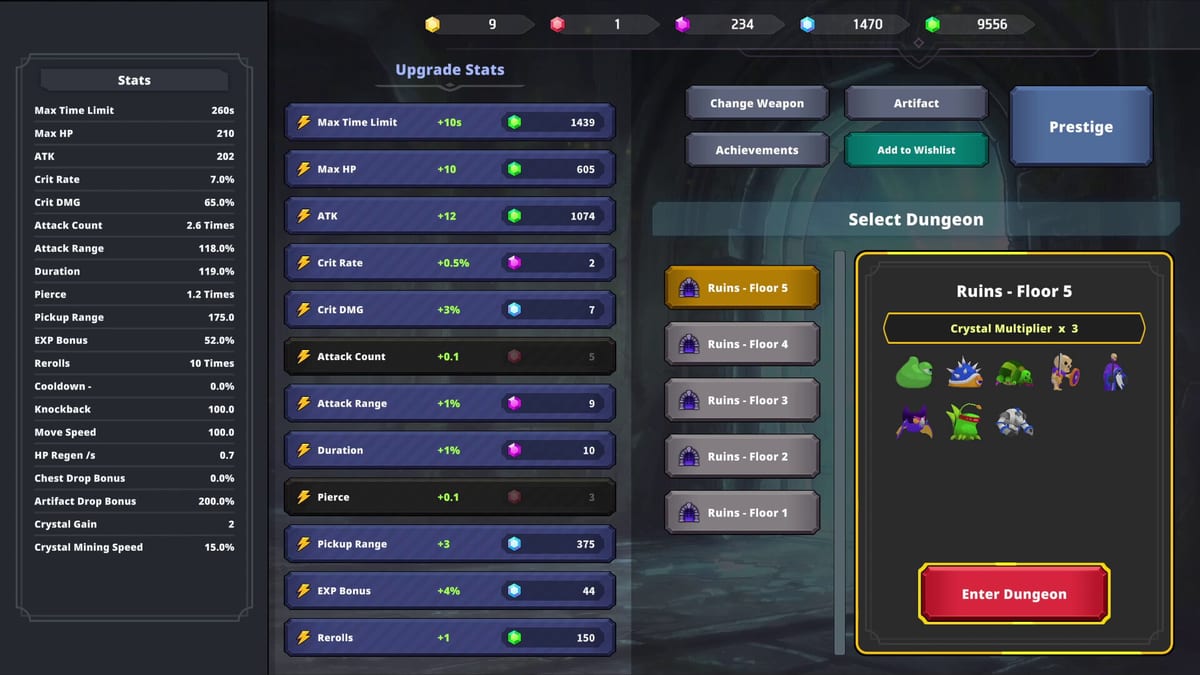
Patch 1.0.03 Controls Improvement added one of Limitless Survivor’s highest-impact quality-of-life features: bulk stat enhancement. While upgrading a permanent stat in the crystal shop, hold Ctrl on keyboard or RB on controller to instantly max that stat using all owned standard Crystals you can spend on it. No more clicking hundreds of single levels after every prestige reset.
This page explains the input, post-prestige workflow, and how to pair bulk upgrade with Stat Planner and Prestige Planner. Movement tuning from the same patch lives on Keyboard and Mouse and Controller.
How bulk upgrade works
Standard crystals buy permanent account stats — typically HP, attack, Time Limit, and pickup range depending on menu layout. Normally each click buys one level until funds run out or the stat caps.
With bulk upgrade:
- Open the stat enhancement screen between runs or from the home hub.
- Select the stat you want to raise.
- Hold Ctrl (keyboard/mouse) or hold RB (controller) while confirming enhancement.
- The game spends crystals in one action to reach the maximum affordable level for that stat.
Requirements implied by Tam Lab’s patch notes:
- You must already own enough Crystals for at least one level — bulk max consumes what you have, not future income.
- Applies to standard Crystal stat upgrades, not Yellow Crystal prestige purchases (Crystals).
If bulk upgrade fails silently, verify you are on 1.0.03+ via Updates Hub and that crystals are standard currency, not Yellow.
Why bulk upgrade matters after Prestige
Prestige spends Yellow Crystals to reset stage progress while boosting Artifact and crystal multipliers (How to Prestige). Permanent stat levels remain, but players re-enter lower floors where pickup range and Time Limit gaps cause most deaths and loot loss.
After prestige, typical reinvestment order:
- Pickup range — stops crystals sitting outside radius; pairs with edge-drop reposition fixes from pre-launch news.
- Time Limit — stabilizes re-climb floors before boss checks.
- HP — survives burst windows while stats catch up.
- Attack — once survival is stable.
Bulk upgrade turns a ten-minute click marathon into seconds. Beginner Mistakes lists skipping bulk upgrade as a common post-reset error.
Post-prestige workflow with Stat Planner
Use this repeatable loop each prestige:
Step 1 — Confirm prestige notification
Pre-launch news added a prestige notification when you hold enough Yellow Crystals for the next tier. Do not reset accidentally during a long AFK block.
Step 2 — Reset and note crystal bank
After prestige, check standard crystal total on the home screen (crystal display fix from pre-launch reduces UI lies). Partial carryover from prior runs still funds bulk spends — see How to Prestige for what persists.
Step 3 — Open Stat Planner targets
Visit Stat Planner or Stat Upgrade Priority and list three breakpoints — minimum pickup comfort, Time Limit for target floor, HP buffer.
Step 4 — Bulk max in priority order
For each stat in order:
- Hold Ctrl/RB on pickup until funds thin or cap reached.
- Repeat Time Limit, HP, attack as crystals allow.
Step 5 — Manual test before AFK
Clear your farm floor three times manually before enabling auto-play (Auto-Play Guide). Bulk upgrade is fast; proving the floor is not.
Step 6 — Resume Yellow farm
Return to Normal Floor 7+ for Yellow Crystals (Yellow Crystals). Patch 1.0.02 doubled Yellow rates — prestige rhythm accelerates on updated clients.
Keyboard vs controller bulk input
| Input | Bulk modifier | Best for |
|---|---|---|
| Keyboard + mouse | Hold Ctrl | Precision menu days, stat shopping between manual runs |
| Controller | Hold RB | Couch AFK prep — bulk spend then enable auto-play |
Both methods share identical spend logic. Movement responsiveness improvements from 1.0.03 apply to both — controller users still reinvest pickup before long stick-only sessions.
Interactions with other systems
Bulk upgrade does not:
- Spend Yellow Crystals on prestige tiers
- Appraise or equip Artifacts
- Unlock skills from Achievements
- Bypass Attack Count cap on gear — that is launch combat math (Weapons)
Bulk upgrade does help:
- Recover from Crash and Stability sessions where you lost a run but kept crystal bank
- Speed re-climb after 1.0.04 VFX removal made results screens quieter — less time in menus overall
- Reduce misclick fatigue that caused under-spending pickup before Performance Tips AFK blocks
Common mistakes
Bulk maxing attack first because it is top of the list — pickup and Time Limit fix more failed re-climbs.
Forgetting modifier key and clicking one level at a time — verify 1.0.03 install if Ctrl/RB does nothing.
Prestiging with unspent standard crystals that could have shortened re-climb — spend or bulk max before Yellow reset when breakpoints are obvious.
Enabling overnight AFK immediately after bulk spend without crash hygiene — bulk upgrade saves time; it does not fix Unity 6000.3 stability limits alone.
Related pages
- How to Prestige — Yellow Crystal timing and notifications
- Keyboard and Mouse — Ctrl plus movement habits
- Controller — RB plus stick pickup technique
- Controls Hub — full input overview
- Beginner Mistakes — pickup underfunding after reset
Bulk stat upgrade is the fastest quality-of-life patch Tam Lab shipped in launch week. Learn Ctrl/RB once — every future prestige pays compound time dividends.
Frequently Asked Questions
Quick answers to the most common questions.
How do I bulk max stats in Limitless Survivor?
Hold Ctrl on keyboard or RB on controller while enhancing a stat to instantly max it with owned standard Crystals.
Which patch added bulk stat upgrade?
Version 1.0.03 Controls Improvement added Ctrl and RB bulk enhancement.
Does bulk upgrade spend Yellow Crystals?
No. Bulk upgrade applies to standard Crystal stat enhancements, not Yellow Crystal prestige purchases.
What stats should I bulk max first after prestige?
Typically pickup range, then Time Limit, then HP, then attack — match your current re-climb failure mode.
Does bulk upgrade work on controller?
Yes. Hold RB while enhancing a stat to max it the same way Ctrl works on keyboard.